
 Posts
Posts


கொஞ்சலும் கெஞ்சலும்
Posted On Jan 29, 2007 at by Prakash G.R.பெரிய அம்மணிய அட்ஜஸ்ட் பண்ணறது ஒன்னும் கஷ்டமான விசயம் இல்லைங்க. அவளுக்கு கோவம் வந்ததுன்னாம் "கோவப்படும் போது நீ ரொம்ம அழகா இருக்க தெரியுமா' அப்படின்னு கத வுட்டு சமாளிச்சிடலாம். ஆனா இந்த சின்ன அம்மணி இருக்காளே, ரொம்ம கஷ்டம்ங்க. அவளுக்கு தோனுனத்தான் செய்வா. ஹூம். அவளக் கொஞ்சினாலும் செரி கெஞ்சினாலும் செரி, ஒன்னும் வேலைக்காகாது. செரி வளவளன்னு ஒளராம வெண்பாக்கு போலாம்.
கண்ணே கனியே அமுதேவென்(று) சொன்னாலும்
நெஞ்சில் குடுப்பாள் உதை
Ubuntu Titbits …
Posted On Jan 28, 2007 at by Prakash G.R.These are small items, which do not belong to a separate blog entry. I'll be adding more to this entry whenever I see one. If you have any such items, feel free to add in the comments.
Activating Windows Key:
This was an annoying thing to me. I work both in Windows and Linux everyday. Whenever I need to go to the menu, I need to remember which OS I'm working on and press the Windows ke/Alt F1 accordingly. Until I found a way to map the Windows key in Linux!
Open Keyboard Configuration (which is under System->Preferences)
In the table, you can find 'Show the panel menu' action under 'Desktop'. Select the shortcut and assign Windows key. Now you can access the menu with Windows key, no matter which OS you are using :-)
Full Screen Mode:
There are times when you want your application to be run in Full Screen mode. Firefox/Image Viewer by default support it. But not all applications, such as Text Editor/Eclipse. If you want to execute them in Full Screen here is the trick.
Open Keyboard Configuration (which is under System->Preferences)
In the table, you can find 'Toggle fullscreen mode' action under 'Window Management'. Select the shortcut and assign your fav key (I've assigned F11). Press 'Close'. Now no matter which application you are using you can press F11 and make it Full Screen. As you rightly guessed, pressing F11 again will bring it back to the normal mode. Now try Full Screen mode for Calculator and see the results :-P
My Computer @ Desktop:
Having a My Computer icon in the desktop is really useful for a guy like me. If you are used to drag and drop your files in the Desktopto delete them, you would surely miss the Recycle Bin errrr Trash Can also. So here is how you can bring them to your Ubuntu Desktop.
Open Configuration Editor (which is under Applications->System Tools) In the tree, navigate to /apps/nautilus/desktop. Int the right hand side, you can see some check boxes with user-friendly (!!!) text like 'computer_name_visible' and 'trash_icon_visible'. Check whichever items you would need in your Desktop. If you really want the same text as windows like 'My Computer' and 'Recycle Bin', you can change it there ('computer_icon_name' and 'trash_icon_name'). You need to change the type from Integer to String before you type in the new name. Remember, you can give Remember, unlike Windows, you can neither right click 'My Computer' and click 'Properties' to get the properties of your computer nor right click 'My Computer' and do 'Manage'.
Related links:
Eclipse in Ubuntu
Putty in Ubuntu
Auto Login in Ubuntu
Screen resolution got struck in Ubuntu
Configure DSL in Ubuntu
Do you think your job sucks?
Posted On at by Prakash G.R.Stupid Project Lead; unrealistic deadlines; long work hours; less pay hikes; ... So you think your jobs sucks? Better read this.
iPhone alternatives
Posted On Jan 27, 2007 at by Prakash G.R.Apple's iPhone user interface is said to be copied from LG's KE850. Both are full screen phones with similar buttons. I thought there should be something from Nokia as well. I was looking into Nokia's site and found a similar model - N800. At $400, this is cheaper than the iPhone and its available in the market now.
BTW when I loaded the site, this is what I've got:
Watch out for the numbers dudes. Not-A-Number is definitly not a number to be displayed in the progress bar!!!
Bank anywhere
Posted On Jan 24, 2007 at by Prakash G.R.Few years back, I opened a PPF account with a SBI branch in Chennai. Today I approached a near by SBI branch in Bangalore to deposit some amount. They said that I can pay only in the branch where I opened. When I asked about "Anywhere Banking" ads, they said it applied only to Savings Account and not to PPF account. I enquired about changing the account to this branch. They said, it might take more than a month for that. Grrrrr.
Ok. Now what to do with the cash? I thought I'll deposit it back into my savings bank account which is with ICICI. I was surprised that they are not getting cash in the counter directly. Rather we need to put it inside a envelope; seal it and deposit it in the counter. They will later open it in a room with surveilance cameras; count the cash and deposit it in my account. Why such a stupid procedure? I asked what if the total amount I've mentioned in the envelope differs from the amount inside. They said they will ignore what I've mentioned in the envelope and update with the actual amount. If that is the case why should I count and update the denomination?
The worst thing, I have to deposit the amount in the same branch where I have the account. If not I've pay 0.5 % charge (with a minimum of Rs 150/-)
That is the truth of "Bank Anywhere". hmmm. Look into more details into "* conditions apply" in the ads.
Microsoft Firefox!!!
Posted On at by Prakash G.R.
Microsoft is releasing a professional version of Firefox. Its awesome. Try downloading and see it yourself.
Search is a solved problem
Posted On Jan 22, 2007 at by Prakash G.R.Wrong. Google admits that search is not a solved problem and they are still working on perfecting it. If you are not convinced, you should answer why people who search for "email id of God" and "what color saree suits a dark woman" end up in my blog. And these kind of funny terms are increasing everyday.
Still not convinced? OK. Lets play a game. Given a site, you need to key in the search terms, so that the site is in first 10 results of Google. No parts of the domain name is allowed for obvious reasons. Shorter the length of words and smaller the number of words, smarter Google is (or smarter you are :-) )
Go.
Real or reel?
Posted On Jan 17, 2007 at by Prakash G.R.Computer Graphics has come so far that in a movie you can't differentiate between the CG generated and the real ones. Now here is a challenge from Autodesk. Find out which photos are real and which ones are generated.
World most amazing race !
Posted On Jan 16, 2007 at by Prakash G.R.The name says it all: The Indian Autorickshaw Challenge
Still need more info? Click here.
Game On !
Posted On Jan 15, 2007 at by Prakash G.R.Nominated Googlipse for Eclipse Foundation Awards.
Let me cross my fingers and wait for March 5th for the results to be announced at the EclipseCon 2007.
[Update: 23 Jan 2007]
The list of accepted nominations is huge with big players like Hibernate tools, Aptna IDE, Subclipse, etc. Its now too hard for a product like Googlipse (which is not even version 1 and focuses on a small community). Lets see ...
Boom boom boom
Posted On Jan 14, 2007 at by Prakash G.R.In my childhood days, there used to be lot of boom boom boom maatukaaran (any translations in English?) coming in streets. Recently I haven't seen any (the last time I saw was in a Fanta Ad I guess). Now in Bangalore, I saw one near Raja's house. Borrowed his camera and took a snap of it. (hmm at least for these reasons I need a Digi cam)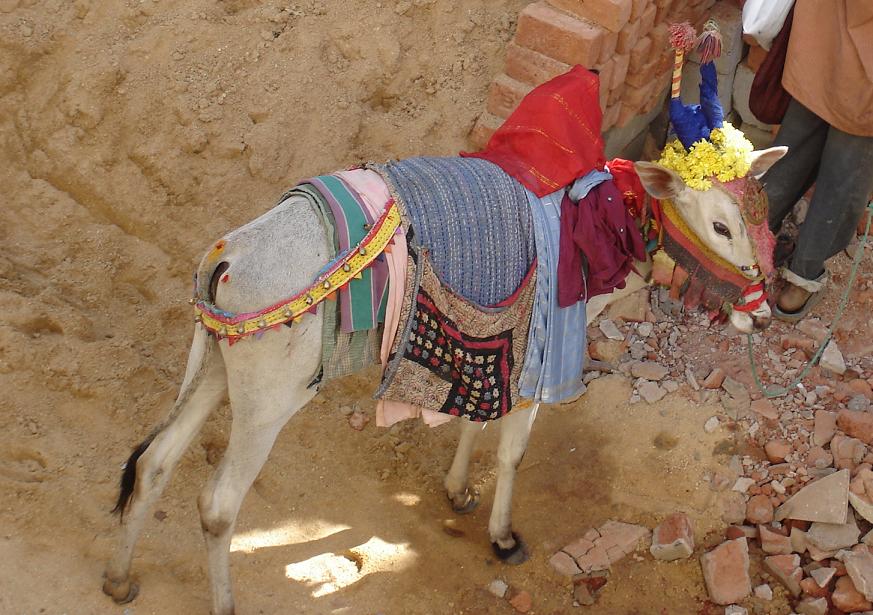
Java 1.6 enhancements
Posted On Jan 12, 2007 at by Prakash G.R.Java 1.6 (officially called as Java SE 6) is released few days back. It includes a number of new API including Manangement API for JVM, Zipped output & input streams, etc. Along with Deque and NavigatableSet in java.util, they have added a new class in the java.util called ServiceLoader. Sounds to be a fine addition, yet to play with it. They have quiely slipped in a new method for copying arrays:
Earlier it was:
int[] newArray = new int[newLength];
System.arraycopy(oldArray, 0, newArray, 0, oldArray.length);
now with the new API,
int[] newArray = Arrays.copyOf(a, newLength);
With copyOf and copyOfRange methods, now Arrays class is really useful when you manipulate the array sizes. It took so many years for Sun to figure out the right need for such a useful API!
Apple reinvents the next ____
Posted On Jan 11, 2007 at by Prakash G.R.When people were typing in commands and looking at the "Bad command or file name", Apple introduced the GUI and the mouse to the computers.
When people were trying to click on the small buttons to scroll the list of artists to select the songs, Apple introduced the click wheel to MP3 players.
When people were trying to use the buttons and call people, Apple introduced a full-screen touch screen to phones.
Now that Apple Computers Inc, is officially renamed to Apple Inc, you can expect much more life style products from Apple. They are going to revolutionize the way we've been living so far.Whats next?
iHome: You switch off the oven/water heater/lights from an small device?
iCar: Turn you head left you car will turn left. It will automatically adjust the speed and gear according to the angle. No wheels!
iPower: You have a wireless mouse, wireless keyboard, etc. How about powering a device wirelessly? Yes, the next Apple laptop will have no wires to the power adapter.
OK. I can come up with so many things, infact anyone can. But I've got a very special idea for Apple. An idea that is worth trillions of dollars: How about a iWife. All it needs to do is understand and execute one single command: "Shut up". I believe that there is a huge market for this product. What say?
PS: iWife is technology patented by Pranni and a royalty of $50 should be given to him when ever you say/write/type the word.
Steve does it again…
Posted On Jan 10, 2007 at by Prakash G.R.Been following thru all the live coverage of the MacWorld. Oh boy! I wish I were there.
Only Steve can run this show. Getting a "wow" from teh audience every now and then; brining up CEO of Google and Co-Founder of Yahoo in a single stage; signing up a contract with Cingular without even showing a prototype; and more importantly, reinventing something. Steve. Only Steve.
I'm longing to see the video of this keynote. Although there were no 'one more things', this would be THE best keynote of Steve.
There is nothing much to be talked about iTV (called Apple TV), rather its all about iPhone. The websites are going to talk about it a lot for the next few months, so no much details here. It costs $499 will be available in India only in 2008. Will I buy it? I may! After all, I bought an iPod for almost the same price 3 years back. This iPhone is a phone + iPod + wifi + bluetooth + ... (and holy cow, it runs a full fledged Mac OS X!!!)
Getting ready for the MacWorld
Posted On Jan 7, 2007 at by Prakash G.R.Alright. 2 more days to go. Steve will appear on the stage and will come with few "one more thing...". This year's hottest expectation are iPhone, full screen iPod and iTv - in the same order. Everybody else is blogging about what they are expecting in the show. I'm not going to do it, as I've done it in last march itself. And most of them are now no longer valid. With the introduction of iTV, TV Tuner card won't be in Mac; 1 TB barrier in hard disk is just now reached and so commercial products with such capaciy will take a little time. Wi-fi iPod is something I still hoping for. Lets see what happens...
Meanwhile, check the image in the home page of apple.com

HDFC Bank …
Posted On Jan 6, 2007 at by Prakash G.R.Banking and Finance sector customers are the risky ones for an IT Company and as I know they charge a huge amount for any project. Still there will be silly errors. Today when I logged into my HDFC Bank's Savings account, I had a message:
Since I've applied for an address change, I thought it might be something related to it. But when I clicked it, I got:
Hmmm. I didn't know that it was really a very special message !!!
Blog in my domain
Posted On Jan 5, 2007 at by Prakash G.R.I was thinking of doing it for a long time, finally today I did it. I've moved my blogs to my own domain. I guess you don't have to change your bookmarks, since most of the feed readers will respect redirection. Just in case if have any problems, point ur feed readers to http:// blog.grprakash.com
The transition was smooth. Good job, WP guys :-)
Mysore Trip
Posted On Jan 4, 2007 at by Prakash G.R.Our company organized a trip to Mysore during the X-Mas weekend. 2 Buses were arranged. The bus from the office was scheduled at 7.30 AM and it didn't start till 8.30 and we were waiting for few more people to join us. Somebody came to me and asked for my helmet. I asked why? He said few guys are planning to go in bike and they need one more helmet for the pillion rider. My helmet came for the trip with a rider, me :-)
The Bangalore-Mysore road is a four-lane highway. Driving is a pleasure. But reaching the road from the office took almost an hour. At Mysore we stayed in Lalith Mahal. With all kind of liquor (they didn't have 7up/sprite for mixing thou), orchestra and dance, dinner was quite good. As with every party there were people who boozed too much and were the center of entertainment for the rest of us.
The next day people went for trekking in Chamundi hills. I was feeling sleepy and so didn't join them. By noon we drove back. We had a stop at Ranganthittu and went for boating as well. Nothing much to describe about the trip. Photos are here:
Amit is planning for a trip to Kanyakumari during Jan 26th. There are less chances for me to join the trip, as I've to go home that weekend. If its on some time March, I'd have definitely joined him. hmmm. Now I miss bachelor life :-(
Wheeling a bike is cool, but …
Posted On at by Prakash G.R.... wheeling a bus???
Its AWESOME
சிரிப்பு …
Posted On at by Prakash G.R.குட்டி பாப்பா வந்ததில இருந்து கவித சும்மா அருவி மாதிரி கொட்டுது. ஆனா எழுதலாம்னு உக்காந்தா, இலக்கணம் அங்க அங்க முட்டுது. ரொம்ப யோசிச்சு நேத்து ராத்திரி ஒன்னு கிறுக்கினேன். இன்னும் ரெண்டு மூணு இருக்கு, நேரம் கிடைக்கும் போது தளை தட்டாம செரியா கிறுக்கி இங்க பதிக்குறேன்.
அவளைக்கொஞ் சும்போது என்மனதை அள்ளும்
நொடியில் மறையும் சிரிப்பு
Eclipse on Ubuntu
Posted On at by Prakash G.R.I've been running Weblogic on Ubuntu and had no problems. But somehow Eclipse was really slow. After a few minutes of Googling, I found that the root cause is the JRE shipped with Ubuntu. Its not the Sun's JRE, but GNU's. Its much slower than the Sun's. Installing a Sun's JRE and running Eclipse on it, made it faster. I've already blogged here about how the licensing terms of Sun blocks the vendors to ship the JRE. Now that Sun has open sourced Java under LGPL, probably the future versions of Ubuntu (or any other Linux distro) should ship with this better and faster JRE
Related links:
Ubuntu Titbits
Putty in Ubuntu
Auto Login in Ubuntu
Screen resolution got struck in Ubuntu
Configure DSL in Ubuntu