
 Posts
Posts


Shrek in Tamil !
Posted On May 27, 2006 at by Prakash G.R.Found it in YouTube. Its good.
GWT tutorial
Posted On May 25, 2006 at by Prakash G.R.I'm trying out few samples with Google Web Toolkit. Its really nice to play with. I googled for a tutorial. Cudn't find anything good. But I managed to find one small GWT tutorial ;-)
Photo: A pose near the beach
Posted On May 23, 2006 at by Prakash G.R.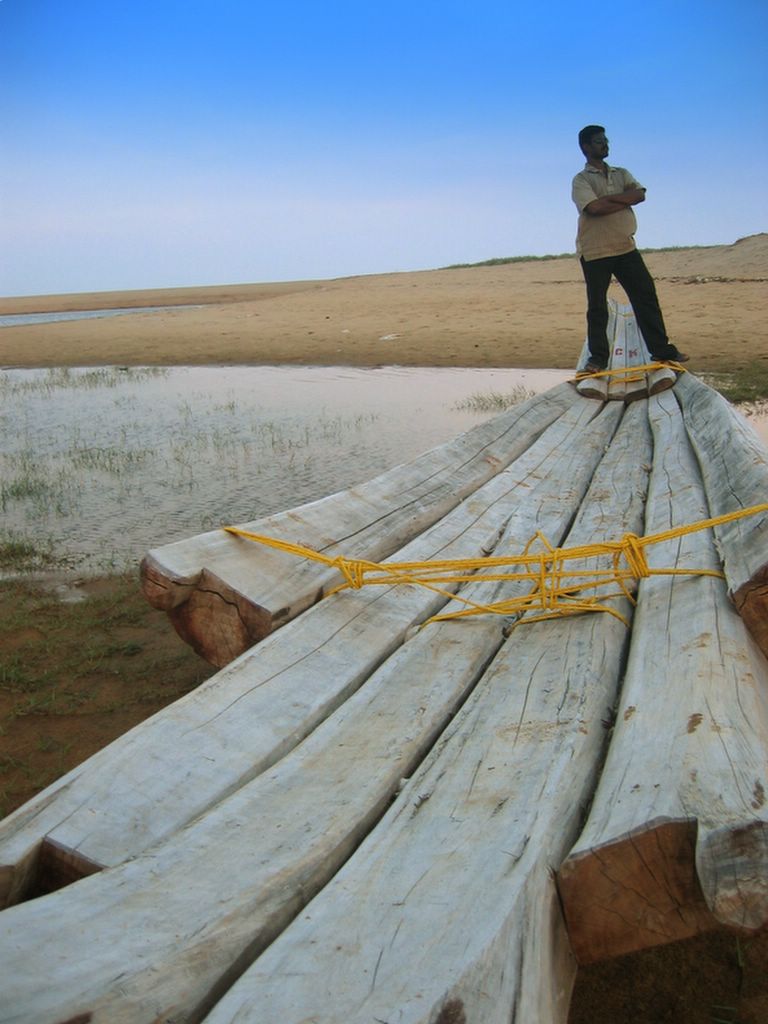
Didn't post any photo for a long time. So here comes a pic. It was taken by me during one of the bike trips to Pondi. The place is near Mahabalipuram. The clean blue sky, the long katamaran and a good pose by Ravi made a good combination. Not to mention about Ravi's tummy ;-)
He-She: Typing in தமிழ்
Posted On at by Prakash G.R.He is a regular reader of this blog and after reading the Tamil LIP for Win XP he decides to install it. After seeing Tamil UI, She is much interested in this.
She : hey, ithu supera irukuda. eppadi pannina?
He : Microsoft-karane itha kudukaran. But defaulta varaathu namma thaniya install pannanum
She : It looks cool da. Tamila type panna kuda mudiyuma?
He : itho (He opens Notepad and types few words in Tamil)
She : eppadida type pannarathu? Tamila neraya character iruke? ellame keyboardla iruka? illa, nee a-m-m-a innu type pannina athu அம்மா-innu Tamil-la transliterate pannikuma?
He : illa, transliterate pannara mathiri neraya software website ellam iruku, but directa windowsla type pannarthu konjam vithiyasama pannanum. ippo கோ venumnu vechiko first க type pannananum. appuram ஓ type pannanum. க + ஓ = கோ thana? So கோ vanthidum. intha mathiri ம + ஈ = மீ varum.
She : nalla than iruku. but ippadi uyir eluthu, mei eluthu senthu type pannina uyir mei eluthu varumnu namakku theriyum. oru elutha padika theriyathavan vantha, avan eppadi type pannuvan?
He : ஙே!!!
Google does it !
Posted On May 18, 2006 at by Prakash G.R.No this is not a post about Google's Calendar or Notebook. Its rather about the GWT - the Google Web Toolkit. Some time back I wrote an entry about Ajax and how hard it would be to maintain a code. Now to make developers life simple, Google has released their Ajax framework. This is the same framework that runs Gmail! At a first look it looks great. I'm going to try it out and give a detailed post later.
Here comes Kicha ...
Posted On May 16, 2006 at by Prakash G.R.ராஜாதி ராஜன், ஓட்டுதலில் சூரன், சீட்டுக்கட்டு விளையாட்டு வீரன், புதிர்கள் களைவதில் தீரன், அவன் தாத்தாவுக்கு பேரன், பிச்சாதிபதி புகழ் கிச்சா, blogging செய்ய வருகிறார், பராக், பராக்
Rationally yours
Win XP in Tamil - an update
Posted On May 13, 2006 at by Prakash G.R.With few days of experimenting with the Tamil LIP, I could see the following good things and bad things about it.
Good:
(*) It definitely looks good and different to see the OS in native language
(*) Sometimes its funny to look at the interface. Some samples: கணினி அவிழ்த்து விடு for Undock Computer, மூடு for Close etc.
(*) Now Firefox displays all tamil blogs properly !!! Hurray. Now it's really good to read இட்லி வடை with Firefox. I don't need IE for that. (BTW, I should have said about that site earlier itself. It has wonderful coverage for TamilNadu elections)
(*) Now I don't have to go to any website for creating Tamil text. Right away in this Blogger text box, I'm typing in தமிழ் !!!!!
Not-So-Good:
(*) Sometimes its funny to look at the interface :-/
(*) The menus of standard windows apps will be displayed in தமிழ். So your favorite Alt+F, and S combination won't work for saving a file. Good thing is Ctrl+S would save you.
(*) There is no way to switch back to English interface. You have to uninstall the LIP to get back to English
(*) As a strange behavior, which I couldn't explain, Eclipse stopped working. The error was 'Can't create VM'. I used to load Eclipse with a Max Memory of 1.5 GB. Now I can't create a VM with that settings. But 1 GB works.
(*) If your co-worker sits and works in your machine and if he doesn't know Tamil, he is in trouble. Sometimes you too can be in trouble. Look at the control panel. Can you find the 'Regional Settings' or 'Display Settings' icon?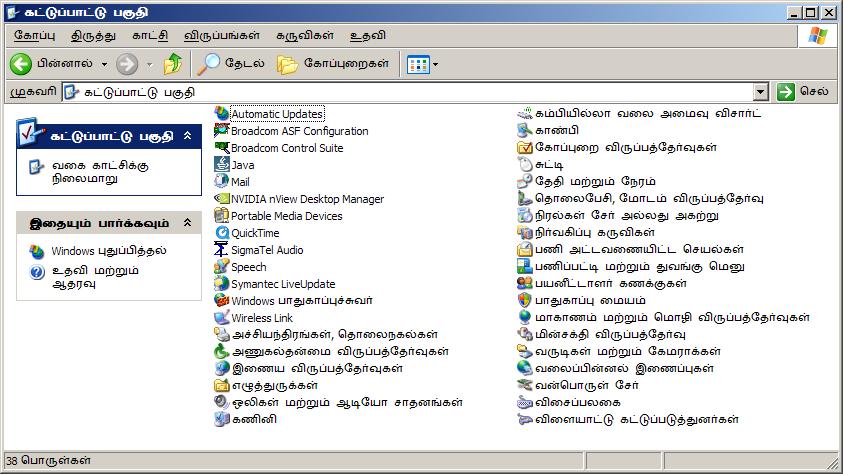
Despite these little troubles, I decided to keep it. Its cool :-) And as a last piece of info, you can install it only on a genuine pack of Windows. If you have a pirated copy of the OS, don't go for it.
Must read
Posted On May 5, 2006 at by Prakash G.R.http://my-bangalore.blogspot.com/2006/05/oh-well-what-hell_04.html
Win XP in Tamil !!!!!!
Posted On at by Prakash G.R.During college days, when we were developing a programming language for Tamil, we were exploring the options to edit Tamil text in Windows 2k. It was not by default supported, but after selecting Indic language support and then enabling Tamil, we were able to keyin Tamil text. UI in Tamil was a different case. Althought support for local languages was there, there is no support for Windows UI in Tamil. I remember trying out Tamil UI in Linux. Official support from RedHat was available and few guys were doing the translations and creating a Tamil locale for Kde. It was an appreciable effort and it worked. (I remember that the RedHat version 7.x. Not sure of the status now). With XP things are better. Windows provides Tamil UI. I tried it yesterday Its coooooool I should say! Look at the screen shots:
Display Properties: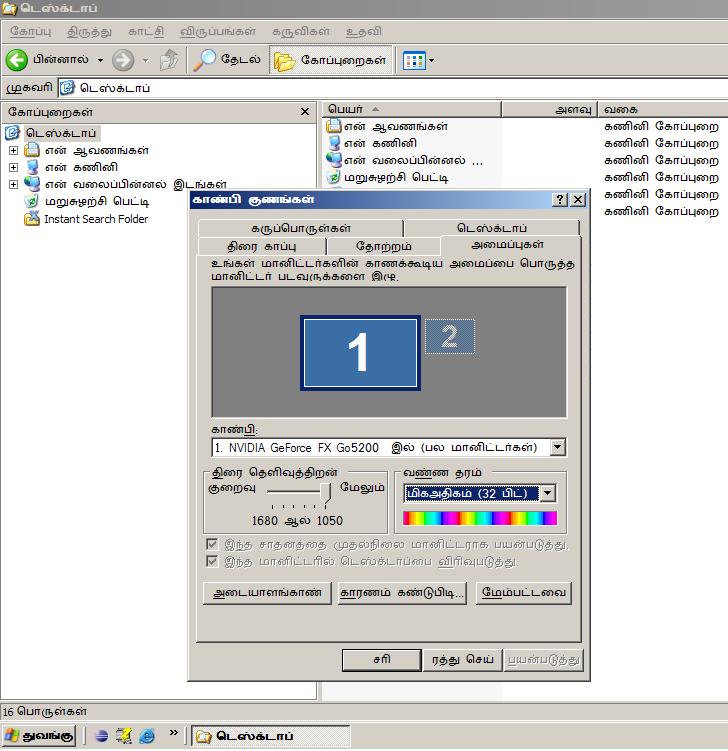
Wireless network properties: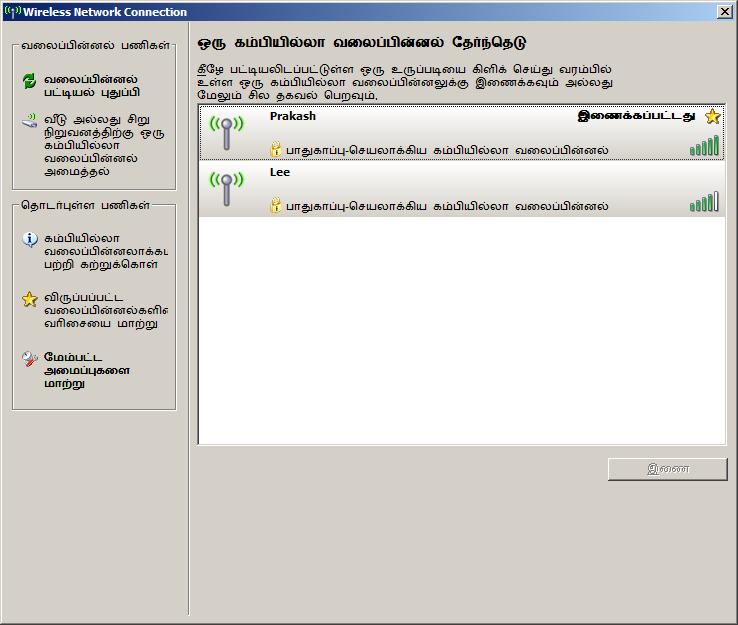
Internet properties:
Connecting to Broadband:
Click here to download the Tamil language pack !